Azure Data Factory: A practical introduction to data integration and movement
INSPYR Global Solutions, Technical Blog

As programmers, we tend to focus on code: line after line of instructions that we enjoy writing, improving, and optimizing. And, of course, code matters.
Still, we also need to be pragmatic. At INSPYR Global Solutions (IGS), we look for ways to explore different technologies, adopt newer and more secure versions, and choose the tools that best fit our needs.
Along the way, we sometimes overlook data, one of the most essential parts of our work. We process it using the language required for the job, whether it is our favorite or not, and we know we can handle large volumes. But enthusiasm and the ability to write code are not always enough. We also need to choose the right tool for each purpose.
When the challenge is to move large amounts of information, filter it, clean it, transform it, and organize it, there are tools designed specifically for those tasks. This is not about giving up programming. It is about working smarter and making better use of the capabilities already available to us.
Our journey has included the earlier Data Transformation Services (DTS), SQL Server Integration Services (SSIS) packages, and now cloud-based options such as Azure Data Factory. Each stage reflects an evolution in how we integrate systems and manage data flows.
This article introduces Azure Data Factory, its fundamental concepts, and its main components. The goal is to understand when it can help us and how its parts fit together in a data integration solution.
Introduction to Azure Data Factory
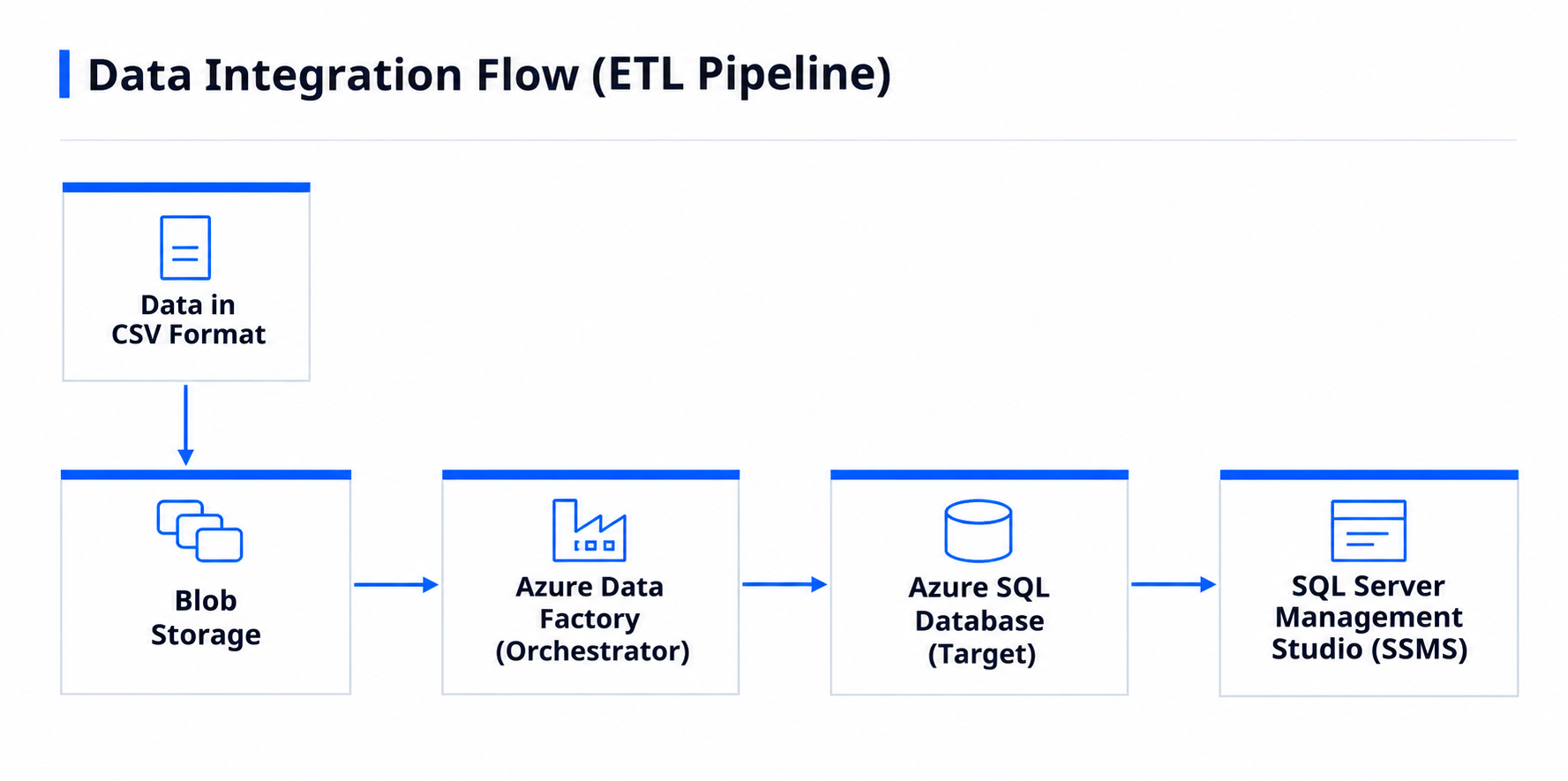
Azure Data Factory (ADF) is a cloud-based data integration service in Microsoft Azure. It allows teams to build, schedule, and monitor workflows that connect different sources and destinations and coordinate tasks such as copying, transforming, and preparing data for analytics or other business processes.
ADF can work with data stored in Azure services, databases, files, on-premises systems, and other supported services. Depending on the scenario, it can move data as-is, perform transformations through integrated services, or orchestrate external processes. The central idea is to define the workflow and let the service execute it while providing visibility into its operation.
One important distinction: Azure Data Factory is primarily a data integration and orchestration service. It does not automatically replace a database, an analytical warehouse, or every specialized transformation process. Instead, it connects and coordinates them as part of the chosen architecture.
Main components
Pipelines: Group and organize activities into a workflow. For example, a pipeline might copy files, validate a load, and then start a transformation.
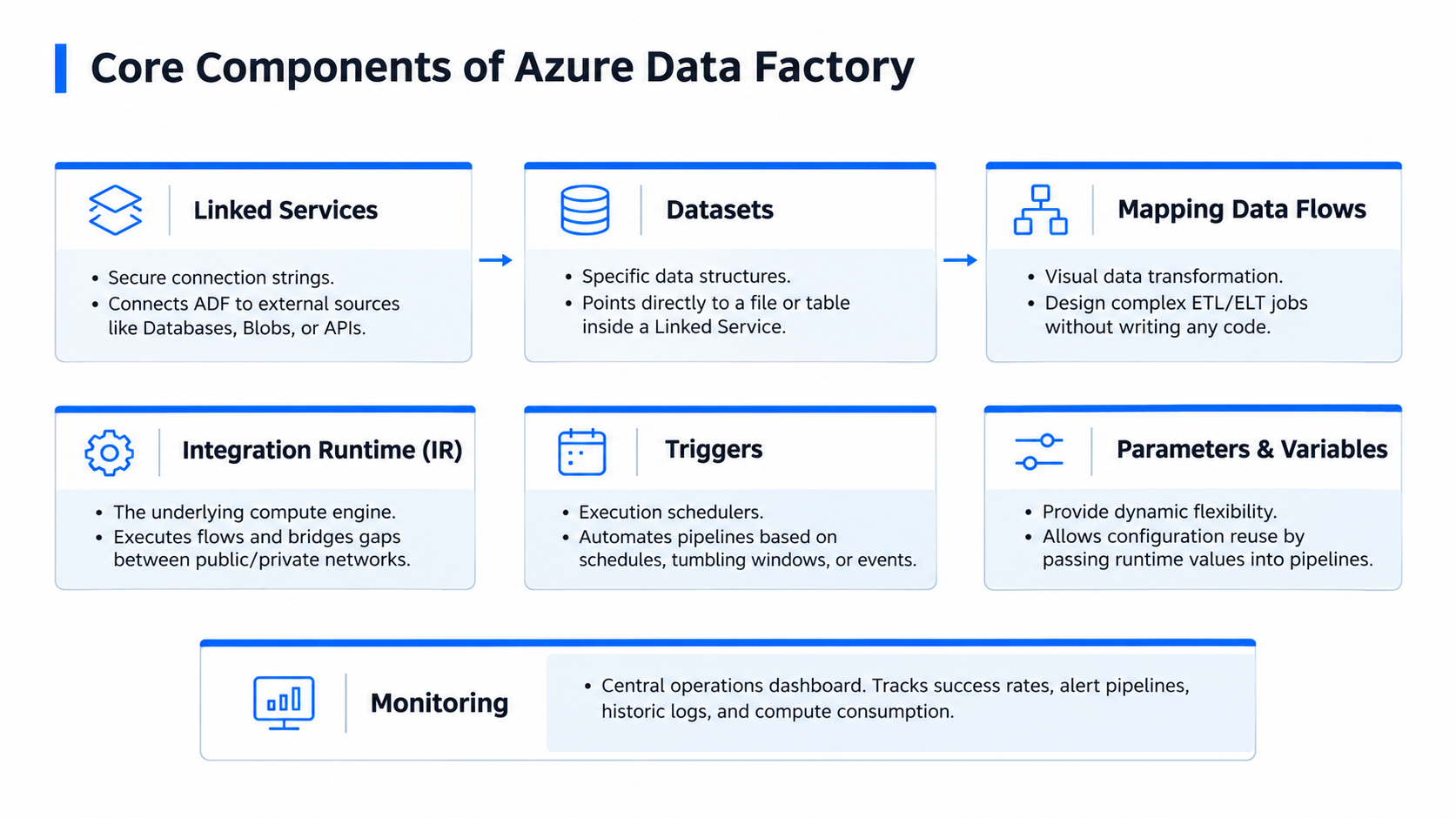
Activities: The individual steps within a pipeline. Examples include copy data, transformation activities, and activities that run stored procedures, notebooks, or processes in other supported services.
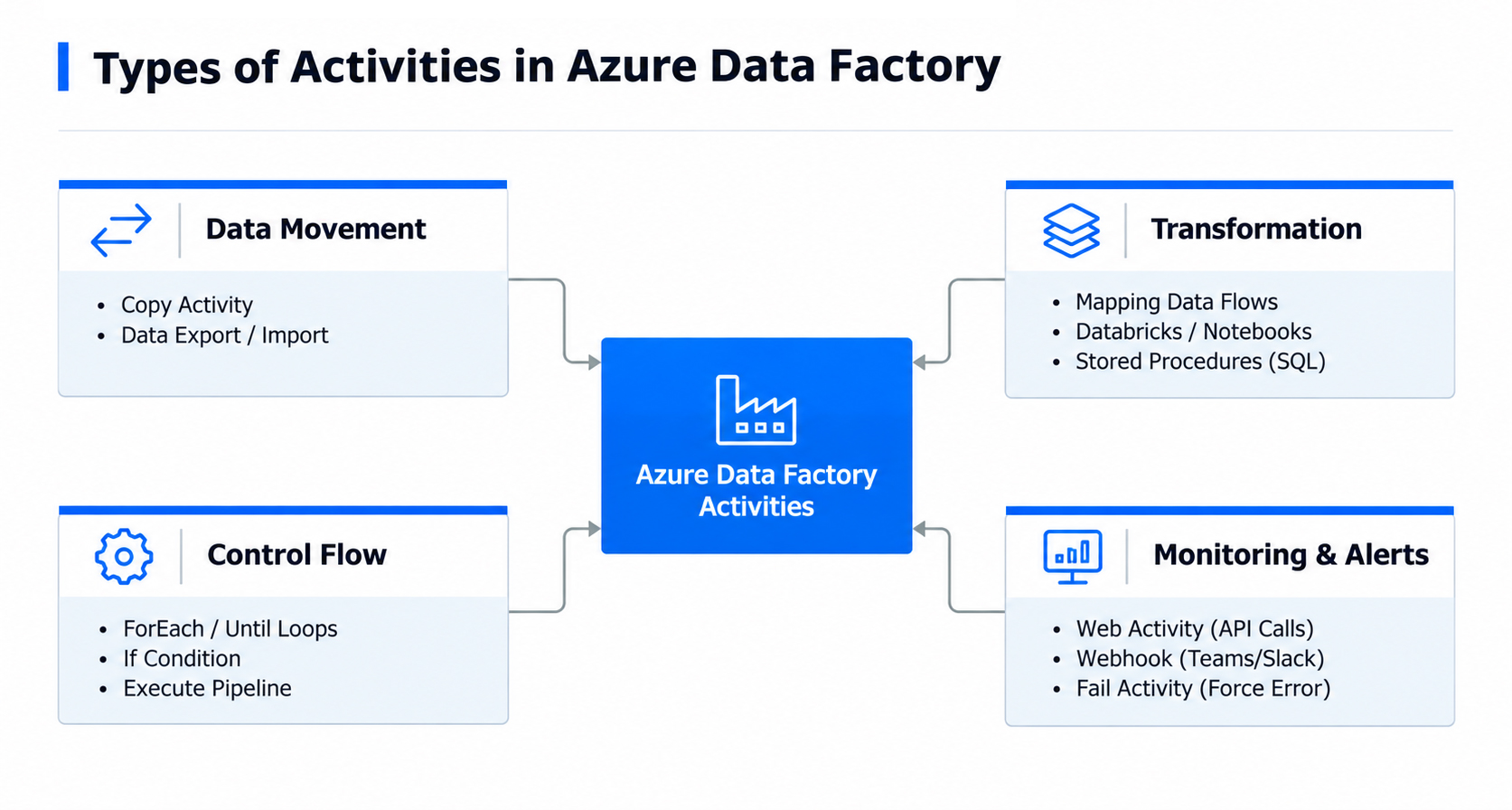
Linked services: Define the connection information needed to access a data source, destination, or compute service. They can reference credentials stored securely.
Datasets: Describe the structure or location of data used by an activity, such as a database table or a file in storage. A dataset does not necessarily contain the data; it represents the data resource within the workflow.
Integration Runtime (IR): Provides the compute and connectivity infrastructure ADF uses to move data, run certain activities, and connect to networks or systems. Depending on the scenario, it may be Azure-hosted, self-hosted, or another managed runtime option.
Triggers: Specify when a pipeline should start, such as on a schedule, during a time window, or in response to supported events.
Mapping Data Flows: Provide a visual way to design data transformations without manually writing all transformation code. They run on the applicable managed compute infrastructure.
Parameters and variables: Make pipelines reusable and configurable with values such as dates, file names, tables, or environments. Parameters provide values for a run; variables hold values during workflow execution.
Monitoring: Shows pipeline and activity runs, duration, status, and errors. It is essential for troubleshooting failures, tracking data loads, and improving reliability.
When should you use it?
Azure Data Factory is useful when you need to integrate different systems, automate recurring loads, coordinate multiple steps, move data between on-premises and cloud environments, or gain centralized visibility into executions.
The final choice should account for data volume, latency, cost, security, transformation requirements, and the capabilities of the source and destination services.
Conclusion
The right tool does not remove the need to understand data or design sound processes. It allows us to focus our coding efforts where they add the most value while relying on specialized services for repetitive integration tasks.
Understanding Azure Data Factory’s components is a first step toward building data workflows that are easier to maintain, observe, and trust.
At IGS, we believe that technical expertise also means knowing when and how to apply different technologies to solve real challenges. By continuously exploring tools and strengthening our knowledge, we aim to develop solutions that respond to the needs of each project while helping our professionals expand their capabilities.
Interested in working with emerging technologies, solving data challenges, and continuing to grow your technical expertise? Explore career opportunities at IGS and discover what you could build with us.

Victor Manuel Labastida Flórez
Victor Manuel Labastida Flórez is a Developer at INSPYR Global Solutions with over 15 years of experience specializing in SQL and .NET technologies. He has worked on projects across industries such as finance, automotive, and consulting, applying his expertise to complex business environments. Outside of work, he enjoys learning about new technologies and spending time with his family.
Share This Article
Contact Us
We’re here for you when you need us. How can we help you today?