
SQL vs. LINQ: choosing the right tool for the job
INSPYR Global Solutions, Technical Blog

As developers, we often focus on writing code that works. If the application returns the expected result, we consider the job done.
But have you ever stopped to think about how your query actually works behind the scenes?
At INSPYR Global Solutions (IGS), we believe great software engineering goes beyond writing functional code. Understanding how data is processed, translated, and executed is just as important as choosing the right programming language or framework.
This is especially true when working with SQL and LINQ.
Despite often being compared, SQL and LINQ are not competing technologies. They solve different problems, operate in different environments, and understanding those differences can significantly improve application performance.
A real-world scenario
There was a time when one of our applications took several minutes to load a list of records.
The data retrieval logic had been implemented using LINQ, with numerous joins and filtering operations. The query returned a large dataset that was later filtered by additional methods before reaching the user.
Rather than continuing to optimize the LINQ query, we decided to approach the problem differently.
By replacing that implementation with a parameterized SQL query using SqlQueryRaw, we moved the filtering directly to the database engine.
The result was immediate.
What had previously taken minutes now completed in just a few seconds.
The solution was less elegant from a coding perspective, but significantly more efficient.
And sometimes, performance matters more than elegance.
Understanding LINQ
To understand why this happened, we first need to understand how LINQ works internally.
Many developers think of LINQ as a convenient way to loop through collections.
In reality, LINQ is a deferred execution engine capable of working in two very different environments.
|
Context |
Internal Type |
How It Works |
|
Objects in memory |
IEnumerable<T> |
Executes using .NET delegates directly in memory. |
|
Databases (Entity Framework, LINQ to SQL) |
IQueryable<T> |
Builds an expression tree that is translated into SQL before execution. |
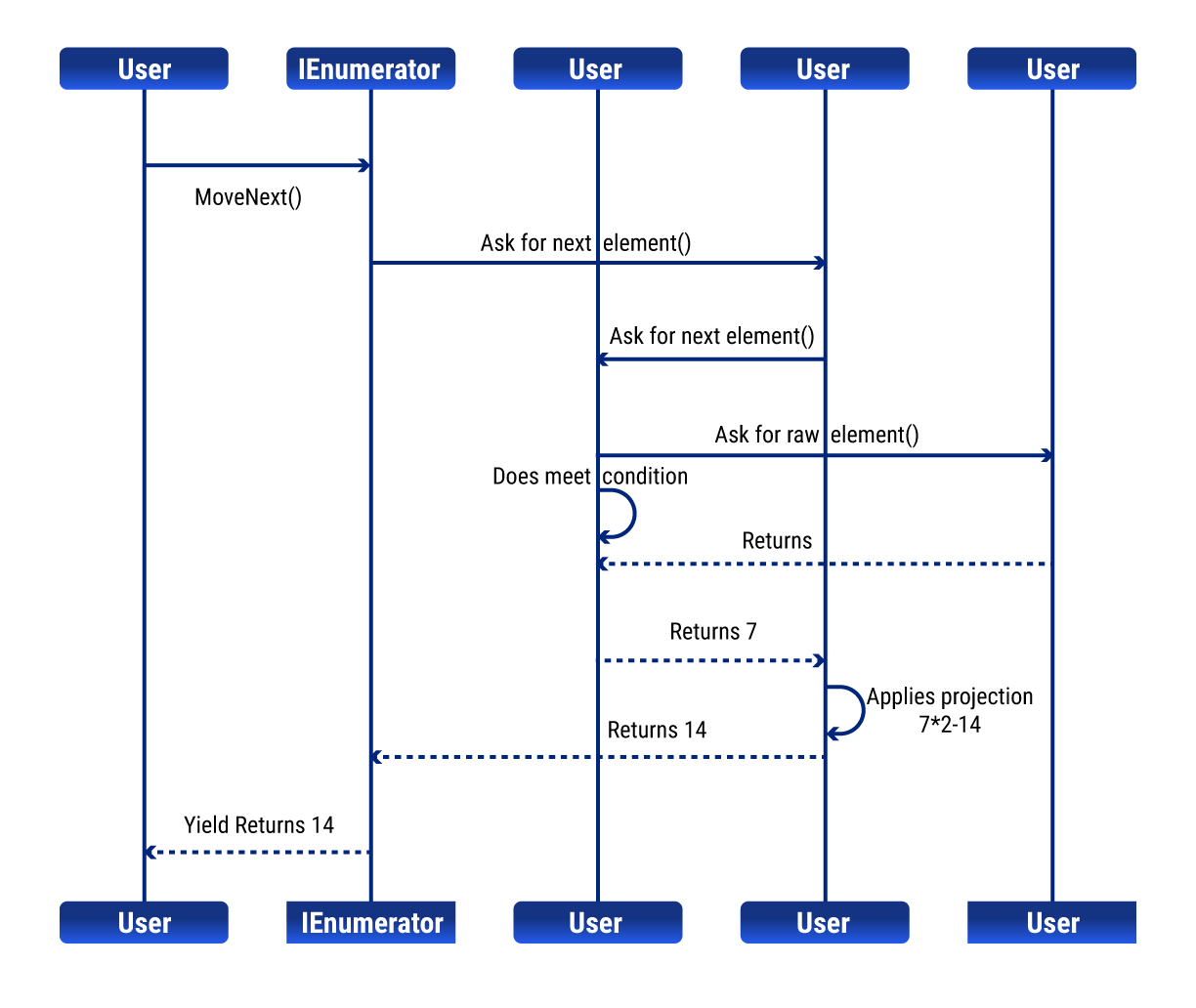
One of LINQ’s greatest strengths is deferred execution.
When you write methods such as Where(), Select(), or OrderBy(), nothing is executed immediately. Instead, LINQ builds a pipeline that is only executed when the application actually requests the data—for example, by calling ToList() or iterating with foreach.
The diagram below illustrates how this execution pipeline works internally.
SQL Server processes a query
Unlike LINQ, SQL Server is responsible for determining the most efficient way to execute a query.
Every request goes through several stages before returning any data.
|
Stage |
Purpose |
|
Parsing & Binding |
Validates syntax, objects, and data types. |
|
Optimization |
Evaluates possible execution plans and selects the most efficient one based on estimated cost. |
|
Execution |
Retrieves the required data and executes the selected plan. |
|
Caching |
Stores the execution plan for future reuse, improving performance. |
One of the most intelligent components in SQL Server is the Query Optimizer.
Rather than searching for the perfect execution plan, it evaluates different strategies and selects the one with the lowest estimated cost.
This process relies heavily on statistics, indexes, and data distribution.
The workflow shown below illustrates how SQL Server processes and executes a query.
Parsing & Binding
|
Parsing: The engine receives your T-SQL query and analyzes it to verify that the syntax is correct, creating a “parse tree” of the database objects. |
|
Binding: The “Algebrizer” component takes the parse tree and validates it, checking that all tables, columns, and objects mentioned exist. It also identifies data types, producing a “query processor tree” that will serve as input for the next step. |
Optimization
|
Cache Lookup: Before an expensive process, SQL Server generates a unique hash value for your query and searches a memory area called the “plan cache” to see if an execution plan already exists for that same query. If it finds one, it reuses it, saving CPU time. |
|
The Optimizer: If no cached plan is found, the “Query Optimizer” kicks in. It is a “cost-based” optimizer. This means it does not look for the perfect plan, but rather one that is “good enough” and fast, using heuristics to avoid evaluating all the thousands of possible options for complex queries. |
|
Decision Making: To estimate cost, the optimizer relies on up to date “statistics”. These statistics contain information about data distribution in tables and indexes, such as density and selectivity, which allow it to estimate how many rows each operation will return and, consequently, choose the most efficient plan. The result of this phase is an “execution plan”. |
Execution
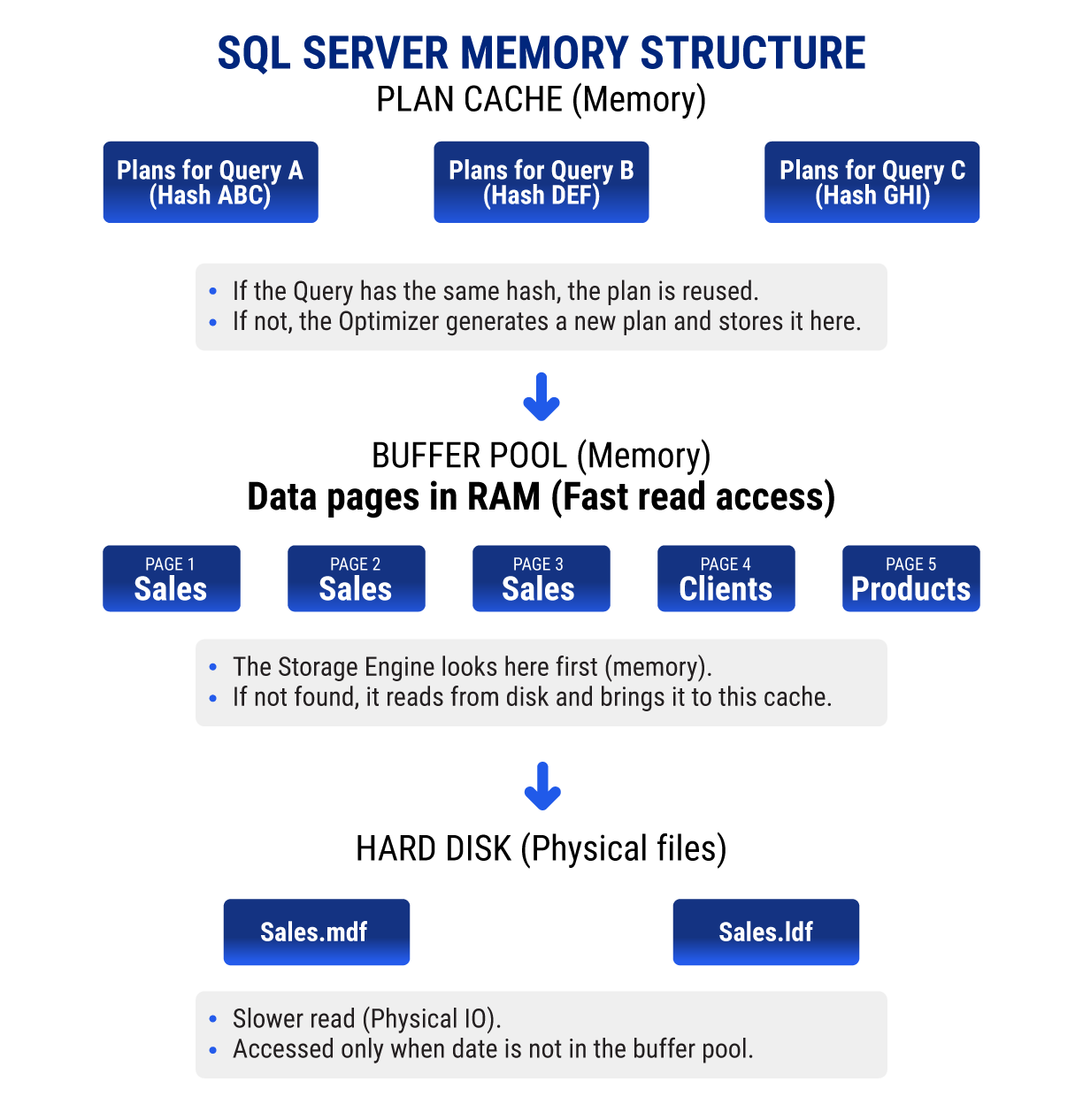
The Relational Engine begins to execute the selected plan. During this process, the Storage Engine is responsible for retrieving the actual data from disks or memory (buffer pool) and passing it to the Relational Engine as needed.
This is where SQL Server’s two main execution modes are used:
|
1. Row Mode: Processes data row by row. It is a traditional method and highly efficient for transactional databases (OLTP). |
|
2. Batch Mode: Processes data in batches of multiple rows at a time, using vectorized algorithms optimized for modern hardware. Originally created for column store indexes, it has been available for row store storage since SQL Server 2019, being much more efficient for large data volumes in Data Warehouse scenarios. |
Caching
Once the query is executed, its plan is stored in the “plan cache” to be reused in future executions of the same query, avoiding the cost of re-optimization. This is a key component for overall system performance.
Why statistics matter
No matter how well a query is written, SQL Server still needs accurate information to decide how it should execute it.
That information comes from statistics.
Statistics help SQL Server estimate how many rows will be returned by each operation, allowing the Query Optimizer to determine whether it should perform an index seek, a scan, allocate memory differently, or choose another execution strategy.
When statistics become outdated, SQL Server can make poor decisions, leading to unnecessary scans, excessive memory allocation, and slower performance.
In other words, even excellent code can perform poorly if the database lacks accurate information.
The diagram below illustrates how SQL Server reuses execution plans through the Plan Cache while retrieving data from memory before accessing disk.
SQL or LINQ?
The answer is not one or the other.
It depends on the problem you are trying to solve.
|
Use LINQ when… |
Use SQL when… |
|
You want readable, maintainable application code. |
You need maximum control over query performance. |
|
Business logic benefits from Entity Framework integration. |
Complex joins or large datasets require optimized execution. |
|
Productivity and maintainability are priorities. |
Performance is critical and every millisecond matters. |
Understanding how both technologies work allows developers to make informed decisions instead of relying on default approaches.
Final thoughts
Writing efficient software is not simply about choosing SQL over LINQ—or vice versa.
It is about understanding how your application communicates with the database, how queries are translated, and how execution plans affect performance.
At IGS, we believe technical excellence comes from continuous learning and a deep understanding of the technologies we use every day. By mastering not only how to write code, but also how that code behaves behind the scenes, our engineers build solutions that are scalable, reliable, and designed to perform in real-world environments.
If you’re passionate about software engineering, performance optimization, and building high-quality solutions alongside experienced technology professionals, explore opportunities at IGS.

Victor Manuel Labastida Flórez
Victor Manuel Labastida Flórez is a Developer at INSPYR Global Solutions with over 15 years of experience specializing in SQL and .NET technologies. He has worked on projects across industries such as finance, automotive, and consulting, applying his expertise to complex business environments. Outside of work, he enjoys learning about new technologies and spending time with his family.
Share This Article
Contact Us
We’re here for you when you need us. How can we help you today?